
Bitso is a cryptocurrency exchange and digital investment platform that lets you buy, sell, trade, store, and send over 100 cryptocurrencies. You can earn interest through the earn program, access advanced trading tools, manage assets in a multi-asset wallet, and even invest in 5,000+ U.S. stocks and ETFs from the same app.
The main drawbacks of using Bitso are higher trading fees, a limited number of cryptocurrencies, and full availability mainly for Latin American users.
In this Bitso review, we will cover how the Bitso exchange works, whether it is regulated, which countries can use it, what cryptocurrencies it supports, and how its fees work. We will also explain Bitso trading features, security measures, account setup, deposits, withdrawals, and whether the platform is safe and reliable.
Bitso Review: What is This Crypto Exchange Platform?

Bitso started in 2014 as a Bitcoin exchange serving Mexico, but over the years, it has grown into a multi‑asset platform offering more than just crypto trading. Basically, you can buy, sell, and store over a hundred different digital assets, move money across borders, and even invest in U.S. stocks and exchange‑traded funds (ETFs) all inside one app.
The platform works as both a centralized exchange and a digital wallet that you can use on your smartphone or computer. Today, Bitso serves about 9 million users and around 2,000 businesses across Latin America. The company was founded by Daniel Vogel (CEO), Ben Peters (CTO), and Pablo Gonzalez, and is headquartered in Mexico City, though its holding company, Badger Technology Company Limited, is registered in Gibraltar.
The Bitso exchange mainly focuses on three things: simplicity, speed, and safety for the average person. Generally, most people use the Bitso app to send money to friends or to buy their first bit of crypto without having to learn how to read complicated trading charts. Well, they also have a professional version called “Bitso Alpha” for people who want to do serious trading with lower costs.
Is Bitso a Mexican Company?
Yes. Bitso began as a Mexican startup, and most of its operations actually remain centered in Mexico. The company’s main office is located in Mexico City, and even its early success was built on offering Bitcoin trading against the Mexican peso (MXN).
While the company began as a local startup, today, it has grown into a global business with offices in several countries and employees from over 27 different nations. So, you should know that while it is “Mexican” at its heart, it operates under international laws and serves millions of people in Brazil and Argentina as well.
Actually, the headquarters are technically located in several places because of how the company is regulated for different services. So, for example, their crypto operations happen through a company in Gibraltar called “The Badger Technology Company Limited”.
Hence, even though they are the biggest exchange in Mexico, they are really a multinational firm now that manages over $80 billion in annual transaction volume. But yes, most people still call it a Mexican company because that is where their biggest user base lives and where they first got famous.
Which Countries Can Use Bitso?
You can use Bitso if you live in Mexico, Brazil, Argentina, or Colombia, as these are the main markets where the platform has full bank integration. This means you can send money from your local bank account directly to the app using systems like SPEI in Mexico, Pix in Brazil, or PSE in Colombia. It is really convenient because the transfers usually happen in just a few seconds and are usually free of charge for the user.
Again, residents of other countries, including many in Europe and Asia, may still be able to sign up and trade crypto assets, but fiat deposit and withdrawal options may not be available. Also, United States and Canadian citizens cannot use Bitso’s retail services due to regulatory restrictions, though some U.S. companies use Bitso Business for stablecoin payments. Hence, Bitso is actually designed for Latin American users.
Is Bitso Regulated?
Yes, Bitso is one of the most regulated exchanges you will find in the crypto space today because it chose to follow the rules from the very beginning. The platform holds a Distributed Ledger Technology (DLT) license from the Gibraltar Financial Services Commission (GFSC). Basically, this licence requires Bitso to segregate customer assets from its own company funds, maintain robust capital reserves, and even undergo routine security audits.
Bitso crypto exchange is also registered with financial authorities in Mexico, Brazil, Argentina, and Colombia to offer digital asset services under each country’s fintech or payment regulations. To be exact, in Mexico, they work with a company called Nvio Pagos. This is a financial entity authorized by the Mexican authorities. Plus, they also follow all the local laws in Brazil and Argentina regarding money laundering and tax reporting to the SAT and Receita Federal.
What Cryptocurrencies Does Bitso Support?
Bitso supports over 100 different cryptocurrencies. You can find all the big names like Bitcoin (BTC), Ethereum (ETH), and Solana (SOL) directly in the app. They also have a lot of stablecoins like USDC and USDT. The exchange is pretty careful about which coins they add, so obviously, you won’t find thousands of random “meme” coins that might crash to zero in one day.
The list includes popular assets like:
- Bitcoin (BTC)
- Ethereum (ETH)
- Ripple (XRP)
- Cardano (ADA)
- Polygon (POL)
- Shiba Inu (SHIB)
- Dogecoin (DOGE)
- Solana (SOL)
You can trade these against local fiat currencies like the Mexican peso, Brazilian real, Argentinian peso, and Colombian peso, or against U.S. dollar-denominated stablecoins.

Bitso Cryptocurrency Exchange Review: Pros and Cons
Pros of Bitso
- Regulation and security: Bitso is actually licensed in Gibraltar and local jurisdictions. It maintains segregated accounts for customer funds and holds CCSS Level 2 and ISO 27001 certifications. Plus, it uses multisignature cold wallets, two‑factor authentication, biometric logins, and AI fraud detection, and it publishes proof‑of‑reserves audits. Hence, to date, Bitso has never reported a major hack.
- Easy local integration: Well, residents of Mexico, Brazil, Argentina, and Colombia can fund accounts via domestic bank transfers (SPEI, PIX, COELSA, or local equivalents) at no cost. The app supports instant transfers of digital dollars across borders and even provides automatic FX conversion when sending money abroad.
- Earn and stock investing: Bitso offers a yield program that pays weekly interest on selected stablecoins and tokens and allows fractional trading of about 5,000 U.S. stocks and ETFs through a partnership with “Alpaca”.
- User‑friendly mobile app: It has both iOS and Android apps, and these are polished and have high ratings. You can buy, sell, earn yield, stake stablecoins, monitor stock portfolios, and send remittances using just one app interface.
Cons of Bitso
- Limited availability: Bitso is not open to retail users in the United States or Canada. Also, some European and Asian residents can only trade crypto because fiat on‑ramps are not supported for them. So, we would say, if you live outside Latin America, the platform may feel incomplete.
- Limited coin list: The exchange lists fewer coins than competitors like Binance or KuCoin. Basically, you won’t find many new altcoins and memecoins to trade.
- Customer service criticism: Trustpilot reviews give Bitso a poor overall rating (2.4/5). Well, most complaints relate to locked accounts, delayed withdrawals, or slow support responses.
Bitso Review: Available Fees Explained
Bitso charges different fees, such as trading fees, deposit and withdrawal fees, and spread. The base fees for the BTC/USDC pair is 0.3% maker and 0.36% taker. There are no deposit fees, and crypto withdrawal fees depend on network congestion.
Bitso Trading Fees
Bitso Alpha uses a maker-taker model for its fees to reward people who provide liquidity. You know, a “maker” puts an order on the books that isn’t filled right away, while a “taker” fills an order that is already there.
The maker fee for stablecoins (like USDC pairs) starts at 0.30%, and the taker fee is around 0.36% for low-volume users. Well, these are competitive trading fees with most regulated exchanges like Coinbase, but they are still a bit higher than what you might pay on some global platforms like Binance or Bybit.
However, if you use the basic app to swap coins, you pay a spread instead of a flat fee. Well, this means the price you buy at is a bit higher than the market price, and the price you sell at is lower. Basically, you might pay between 1.5% and 2.0% in hidden costs this way.
Also, Bitso charges different fees for different pairs. So, for example, buying using Mexican Pesos (MXN) costs 0.6% maker and 0.36% taker fees. It even offers a tiered fee discount for high-volume traders (check screenshot below).

Bitso Deposit Fees
Depositing local currency into Bitso is almost always free of charge for the user. So, you will find that bank transfers via SPEI (Mexico), COELSA (Argentina), PIX or TED (Brazil), and local wire transfers (Colombia) are free, and these transfers usually settle in minutes for PIX and within 24 hours for COELSA and Colombian bank deposits. You can also deposit USDC through Payoneer, but this time, there’s a 2.9 % fee to cover processing costs.
Crypto deposits are free across all networks. Here, you only need to pay the network fee required by the blockchain you’re sending from, and Bitso doesn’t charge an extra markup.
Bitso Withdrawal Fees
Bitso fiat withdrawals within Latin America are free. So, you can send money back to a linked bank account in Mexico, Brazil, Argentina, or Colombia with zero fees, and the transfer usually arrives instantly.
Now, for crypto withdrawals, you have to pay the network fee. Bitso calculates based on how busy the blockchain is. So, for example, sending Bitcoin might cost you around 0.000015 BTC, while sending Solana costs almost nothing. Generally, sending stablecoins on the Ethereum network is usually the most expensive, as they often cost between $3 and $10 USD, depending on the time of day. Bitso shows you the exact fee on the confirmation screen.
Are There Any Hidden Fees on Bitso?
Bitso does not have many “hidden” fees in the sense that they are trying to steal your money quietly. However, the price spread in the mobile app can definitely feel like a hidden fee to a new user. You see a price for Bitcoin on Binance, but when you go to buy it on Bitso, the price is about 1% or 2% higher.
Well, this is how the company makes its profit on the “simple” version of their service, and it is not a secret (even Coinbase does the same), but many people don’t realize they are paying this extra cost. So, beyond this, there are no surprise charges or forced insurance fees.
Bitso Review: Key Trading Features and Advanced Tools
The top features of Bitso are integrated stock trading with crypto trading, an earn program, advanced trading tools with Bitso “Alpha”, a user-friendly mobile app, and a secure Bitso Wallet.
Bitso Review: Integrated Crypto and Stock Trading

Bitso partnered with broker‑dealer Alpaca in early 2025 to bring commission‑free stock and ETF trading into its app. Here, you can invest in approximately 5,000 U.S. equities and ETFs using dollars or stablecoins, and you can buy fractional shares for as little as one dollar.
You can buy a tiny piece of companies like Apple, Tesla, or NVIDIA with as little as 20 pesos. And the best part is that you can manage your stocks and your Bitcoin in the same exact app. The stocks are held through a regulated broker in the US, and your account is actually SIPC insured up to $500,000.
You don’t have to open a separate US brokerage account or deal with complicated tax forms for every trade. Well, the trading hours for stocks are 24/5. Hence, this means you can trade even when the New York Stock Exchange is closed.
Bitso Review: Earn Program
Bitso’s yield feature, sometimes also called Bitso Yields, pays weekly interest on selected stablecoins and tokens. You simply need to opt in within the app and enable earnings for each eligible asset. It’s a simple earn, so obviously, there are no lock‑up periods. You can withdraw your coins whenever you like.
You will find that yields are variable and depend on market conditions; stablecoins like USDC typically earn around 4% annualised, while crypto assets such as Bitcoin may earn between 1% and 3%.

Bitso Review: Alpha Trading Tools
Bitso offers the Alpha interface for advanced traders with advanced tools. It’s a web and mobile portal that includes candlestick charts, depth charts, and technical indicators powered by TradingView. You can place limit, market, stop‑loss, and stop‑limit orders, adjust time frames, and even monitor order books with real‑time data.
You can trade dozens of pairs against the Mexican Peso (MXN), Brazilian Real (BRL), or USDC. The depth of the market is usually good enough for most retail traders to buy or sell without moving the price too much. Actually, many big companies in Latin America use Bitso Alpha to manage their corporate treasury.
But still, Bitso does not offer margin trading or derivatives, so you can’t short or leverage positions. Hence, if you need futures or perpetual contracts, you obviously need to transfer funds to another platform.

Bitso Review: Mobile App
The Bitso mobile app is available for both Android and iOS and currently has over 10 million downloads on the Play Store alone. The design is simple, with big buttons and clear text. You can check your balance, send money for free via “Bitso Transfer”, and buy crypto in about three taps.
The app lets you toggle between Quick Trade and Alpha modes; Quick Trade offers instant conversions for beginners, and Alpha gives you more granular control. You can monitor prices, set price alerts, deposit and withdraw fiat or crypto, send remittances, and manage your yield settings.
Bitso Review: Multi-Asset Wallet
The Bitso wallet is your central hub for managing crypto, stablecoins, and U.S. stocks, as it supports over a hundred tokens and automatically displays your holdings converted into your local currency.
You can easily generate unique addresses for each asset, receive payments via QR code, and send funds to other wallets or Bitso users. Plus, the wallet also stores your stock positions and displays real‑time performance. You can also use the wallet to pay for things at local stores that accept QR code payments in some countries.
How Secure is Bitso’s Wallet?
Bitso Wallet is highly secure due to its advanced security measures and regulatory licenses. The company stores most user funds in multisignature cold wallets, and hot wallets hold only enough crypto for daily withdrawal needs. The other security measures include two‑factor authentication, device management, and biometric login.
Also, Bitso underwent a full CCSS v9 Level II audit in late 2025. Well, this assessed its key generation, wallet architecture, backup procedures, transaction signing, operational security, and physical protection.
How to Open an Account and Sign Up on Bitso
Step 1: Download the app or visit the website
You need to install the Bitso app from the Google Play Store or Apple App Store, or use a web browser if you prefer a desktop experience. Tap “Sign Up” and enter your email address. Also, if you want some welcome bonuses as a new user, you can also check out our guide on the best free crypto sign-up bonuses.
Step 2: Set up your login credentials
First, you should select your country of residence, and then enter your email, create a strong password, and accept the terms of service. Also, you should enable two‑factor authentication right away using an authenticator app or SMS for added security.

Step 3: Verify your identity
Now, to comply with regulations, Bitso crypto exchange requires you to submit a government‑issued ID (for example, a national ID card, driver’s licence, or passport) and take a selfie. You may also need to upload proof of address, like a utility bill or bank statement. The KYC verification process usually takes a few minutes to a few hours.

Step 4: Fund your Bitso account
You can choose “Deposit” to see your options, and if you’re in Mexico, transfer pesos via SPEI; in Brazil, use PIX or TED; in Argentina, use COELSA; in Colombia, use a local bank. Plus, if you’re depositing crypto, you should generate a deposit address from the wallet tab and send funds from another wallet.

Step 5: Start trading or investing
Finally, you can go to the “Convert” tab for simple swaps or to “Alpha” for a more advanced trading interface. You can also activate the Earn program from your wallet or start buying fractional shares of stocks under the “Stocks” tab.
Does Bitso Require KYC?
Yes, Bitso platform requires Know Your Customer (KYC) verification for every single user who wants to use the platform. Because they are a regulated financial institution, they have to follow the same rules as a traditional bank, and this also helps prevent illegal activities and keeps the platform safe for everyone. So, you cannot skip this part if you want to trade, connect your bank account, or withdraw your funds.
Actually, the process is quite fast these days, as you just need to take a photo of your government ID (like your INE in Mexico or RG in Brazil) and then do a quick liveness check by moving your head in front of the camera. Basically, if your photos are clear, the system usually verifies you in less than 5 minutes.
How to Trade Crypto on Bitso
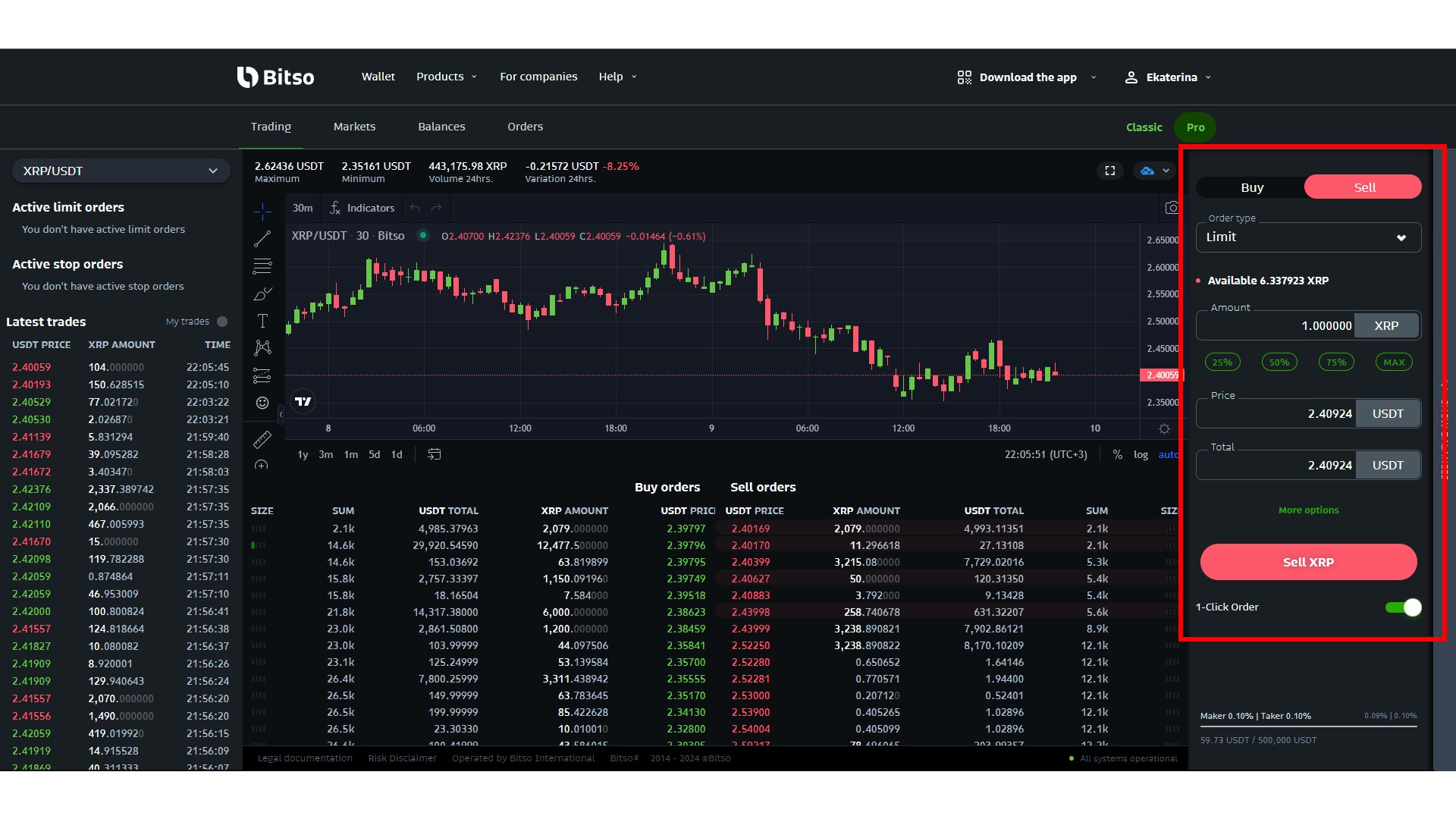
To trade crypto on Bitso crypto exchange, you need to go to the “Alpha” section and follow these steps:
- Choose a pair: You should go to the Bitso Alpha trading section to find the asset pair you want to trade. Actually, you can use the search bar on the top left to find common pairs like BTC/MXN or ETH/USDC.
- Select an order type: You must choose an order type that matches your specific investment strategy. So, you can either select a “Market” order if you want to buy or sell instantly at the current best price available, or use a “Limit” order if you want to set a specific price you are willing to accept for the trade.
- Enter amount: You need to enter the specific amount of crypto you want to buy or sell in the trade box. The platform will immediately show you the estimated cost or the total amount of money you will receive from the sale.
- Review fees: You should review the Bitso fees before you confirm the transaction details. The order form clearly shows you the maker (0.30%) or taker (0.36%) fee that applies to your specific trade.
- Place the order: You can now click the “Buy” or “Sell” button to finalize your request to the open market.
How do I Withdraw Funds from Bitso?
To withdraw fiat or crypto from your Bitso account, you should follow these steps:
- Open the wallet tab: You should log into your account and tap on the “Wallet’ icon to get started. Now, select the specific asset you wish to take out, whether it is a local currency like Mexican Pesos or a cryptocurrency.
- Choose withdrawal method: The platform lets you choose a withdrawal method based on the type of money you are moving. So, for cash, you should pick your saved bank account for a local transfer, and for crypto, you must select the correct blockchain network like Ethereum (ERC-20) or TRON (TRC-20).
- Enter destination details: You have to provide the destination details with extreme care to avoid losing your money forever. Basically, confirm your 18-digit CLABE number for Mexican banks or even your PIX key for Brazil before you proceed.
- Specify the amount: Now, you need to specify the exact amount of money or crypto you want to send out of the platform. The app will immediately display the network fee and any other small costs that might apply to your transaction.
- Confirm: The final step is to verify and confirm the transfer using your security settings. You must complete the “Two-Factor Authentication (2FA)” process or use your face scan to authorize the move.
Bitso Review: Customer Support and User Feedback
Bitso offers several support channels, including live chat, email tickets, a comprehensive knowledge base, and social media. It is generally asked to use the “Chat” system because it’s fast. Generally, they are pretty good at answering common questions, and their “Help Center” is full of useful guides. They also have a presence on social media like X (Twitter), where they post updates about system maintenance.
Now, if you look at user feedback on places like the App Store, the platform has a high rating of around 4.6 stars. Most of the people love how fast the bank transfers are and how clean the app looks. But still, you will find some negative feedback from people whose accounts were locked for security checks. Actually, this usually happens because of the strict KYC rules, and the support team usually fixes it once you provide the right documents.
Is Bitso Worth It for Beginners?
Yes, Bitso is definitely worth it for beginners if you live in Mexico, Brazil, Argentina, or Colombia and want an easy way to buy Bitcoin or stablecoins with your local currency. The app is actually designed for beginners, with clear menus, instant conversions, and built‑in guidance.
You can start with a very small amount, like 10 or 20 pesos, so you don’t have to risk a lot of money to learn how it works. Also, the fact that it is fully legal and regulated gives you a level of protection that you won’t find on many offshore cryptocurrency exchanges. You can easily deposit funds using a bank transfer, so you don’t need a credit card or a complicated wire transfer.
Conclusion: Is Bitso Safe and Reliable?
To sum up our Bitso review, it is one of the safest and most reliable choices for anyone in Latin America. They have spent over 10 years building a reputation for following the law and protecting their users’ money with high-end security. While the fees on the simple mobile app can be a bit higher than the market average, the convenience and the direct link to your local bank account make it worth the cost for most people.
You see, no investment is ever 100% safe because the crypto market can be very unpredictable. But obviously, if you want a platform that is easy to use, highly regulated, and offers more than just crypto, Bitso is definitely a top-tier option.